Developers have several tools and APIs at their disposal for performing real-time web searches in applications (similar to search in Google or in Bing that OpenAI’s experimental web_search_preview tool[1][2] uses). These APIs allow an app or AI agent to fetch up-to-date information from the internet, often with features tailored for LLM integration (reducing hallucinations by grounding answers in current data[3][4]). Below, we overview prominent web search APIs – including Tavily – and compare their features, pricing, performance, and suitability for various use cases.
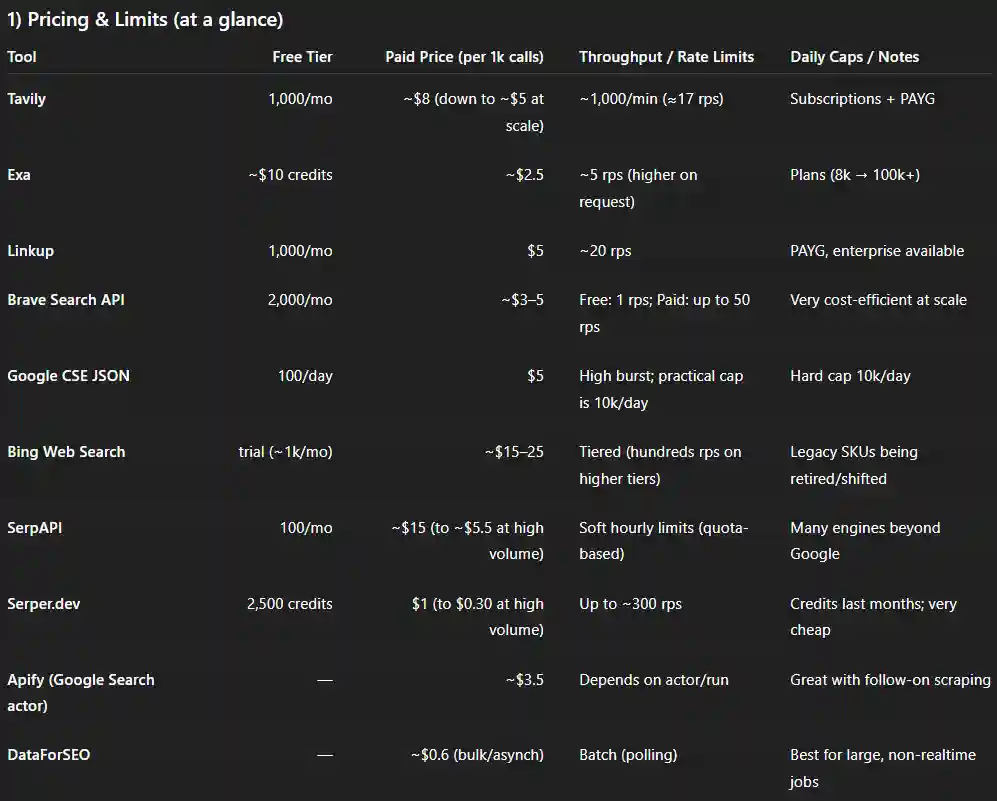
Pricing and rate limits for real-time web search APIs (free tiers, cost per 1k calls, throughput, caps)
Tavily Search API
Tavily is a search API purpose-built for AI agents and retrieval-augmented generation (RAG) workflows. It aggregates multiple search sources to return concise, factual results optimized for LLM consumption[5]. Features: Tavily performs real-time web searches with an emphasis on fresh, accurate data[6]. Developers can filter results by recency (e.g. past day/week/month/year) and by domain inclusion/exclusion, or adjust search depth (basic vs. advanced) to control result breadth[7]. The API returns rich snippets (often 3000+ characters of content) from each result, providing substantial context[8]. Uniquely, Tavily can produce a direct answer summary to the query with citations if include_answer is enabled[9]. All retrieved information is accompanied by source citations[10] to ensure transparency. Tavily also offers a separate “Extract” endpoint to retrieve and clean full webpage content for deeper research. Integration & Ease of Use: The service is easy to integrate – a simple REST API, with official Python SDK and LangChain integration available[11]. It’s designed to work out-of-the-box with LLM agents (LangChain, LlamaIndex, etc.), minimizing prompt engineering for tool use. Pricing: Tavily provides 1,000 free API credits per month for developers to test and small-scale use[12]. Beyond that, it offers pay-as-you-go at $0.008 per credit (about $8 per 1,000 queries, dropping to approx. $5/1k at higher volumes)[8]). Monthly subscription plans (e.g. $30/mo for 4k credits) and enterprise tiers with custom rate limits are also available[13][14]. Rate Limits & Performance: Tavily’s API is optimized for speed, typically returning results in a couple of seconds[15]. It supports high throughput – up to 1000 calls per minute (≈17 QPS on average) on default plans[8] – suitable for real-time agent use. Data Freshness & Accuracy: Tavily prides itself on up-to-date results; it actively fetches current information so that answers reflect the latest data (e.g. news, reports)[6]. The focus on factual, cited snippets makes it well-suited for chatbots and assistants that need trustworthy answers grounded in recent sources (e.g. answering user questions with citations in a chat). In summary, Tavily is a strong choice for LLM applications that need reliable, LLM-optimized web search with minimal configuration – such as research assistants, AI copilots, or dashboard widgets displaying live info.
Exa Web Search API
Exa is a modern AI search engine with its own index and a suite of APIs for web search and content retrieval[16][17]. It’s designed for real-time, intelligent search and even deep research tasks. Features: Exa’s core search endpoint can return a list of relevant webpages along with their full content. In fact, Exa’s snippet size can include the entire page content for each result[18], enabling applications to feed long passages directly into an LLM’s context. Exa uses a combination of traditional keyword search and neural semantic search to understand query intent and find precise information across the web[19]. It supports filtering by date, domain, and category; developers can specify search verticals like general web, news, or others (Exa’s API supports parameters for query type and even offers a separate “Websets” feature for large-scale, multi-step searches)[20][21]. Notably, Exa provides dedicated endpoints beyond basic search: an /answer endpoint that returns a natural-language answer summary synthesized from search results, and a /research endpoint that gives structured, in-depth results[22][23]. This makes it easier to build agents that can both retrieve documents and get quick answers. Integration: Exa offers client libraries (Python, JS) and is designed to integrate with AI frameworks – for example, they provide tool schemas for OpenAI function calling and Anthropic, so an LLM can call Exa’s search as a tool seamlessly[24][25]. Their documentation and SDKs are comprehensive, reflecting an enterprise-ready developer experience. Pricing: Exa has a free credit allotment (about $10 worth of free queries for new users)[18], which roughly equates to a few thousand searches depending on usage. Beyond that, it’s a pay-as-you-go model roughly at $2.50 per 1,000 calls[18] (Exa’s pricing may vary with volume; $2.5/1k is their at-scale rate). They also offer subscription plans (e.g. $49/month for 8k credits, $449 for 100k credits[26]) and higher tiers for enterprise. Rate Limits & Performance: The standard rate limit is around 5 searches per second[18] by default, but Exa’s “Fast” mode and enterprise options can raise this. Latency for a basic search is usually a few seconds. (Exa often touts its performance optimizations; it even reports outperforming some competitors in LLM-agent benchmark accuracy[27][28].) Data Freshness: Exa maintains its own web crawler and index (having raised a large funding round to build out an independent search stack) and indexes new pages daily. It can handle “live” queries well and even supports on-demand crawling for content that isn’t already indexed. Use Cases: Exa is ideal for applications that need extensive context or many results from the web – for example, a research agent that needs full articles/text (not just snippets), or a meta-search that finds dozens of results. Its ability to do semantic search means it might find relevant info even if exact keywords aren’t present, which is useful in complex question answering. For a chatbot that needs a quick fact, Exa can provide an answer via its answer API; for a data-analysis tool, Exa can supply large text blocks from relevant pages. Overall, it’s a powerful but also more complex tool – excellent for deep RAG pipelines and enterprise knowledge applications.
Linkup Search API
Linkup is another AI-focused web search API, known for delivering high-quality, factual results and integrating “premium” content sources[29][30]. Many developers consider Linkup’s results very precise and well-suited for grounding LLM responses. Features: Linkup performs natural-language web searches and returns results in a structured JSON format. It supports multi-format content, meaning it can retrieve text from webpages as well as references to images, PDFs, videos, or audio if relevant[31][32]. The standard search results include title, URL, and a snippet (up to approx. 5000 characters of text from the page)([33]), which is among the longest snippets available – useful for providing context to an LLM. A standout feature is Linkup’s ability to return a “sourced answer”: you can ask a question and get a concise answer paragraph with cited sources[34][35]. By using output_type: "sourcedAnswer", the API will synthesize an answer from the top results and provide a list of source URLs and snippets supporting that answer[36][37]. This is essentially an AI-powered summary that’s extremely handy for chatbots and QA systems. Linkup also allows tuning the search depth (“shallow” vs. “deep”) to trade off speed and thoroughness[38][39]. For recency, it supports fromDate/toDate parameters to filter by publication date, so you can ask for only very recent information[40][41] (it’s capable of surfacing news published minutes ago in some cases[42]). Domain inclusion/exclusion lists are supported as well for focusing on specific sites[41][43]. Integration: Linkup provides an easy-to-use REST API and official SDKs (e.g. a Python linkup client as shown in their docs)[44][45]. It also offers specialized integrations (like a Claude AI plugin and Google Sheets add-on[46][47]). Documentation includes prompting guides for best results[48], indicating a developer-centric approach. Pricing: Linkup offers a free tier of 1,000 searches per month, no credit card required[33]. After that, it’s pure pay-as-you-go at $5 per 1,000 calls[33] (with no monthly minimums). This straightforward pricing, plus the focus on quality, often makes Linkup a cost-effective choice for production systems. Rate Limits & Performance: The API allows about 20 calls per second by default[33], which supports real-time use even for moderate traffic applications. In practice, developers report that Linkup’s “deep” searches can be a bit slower (since it might fetch more content behind the scenes), but still generally respond in a couple of seconds. Data Freshness & Accuracy: Linkup emphasizes factual accuracy – it integrates content from trusted sources (including premium news or databases) beyond just a standard web crawl[29][30]. This yields high precision results, which is why some have found Linkup’s answers more reliable (with less noisy content) for domains like finance, science, etc. For example, Linkup would be well-suited for an enterprise answer bot or dashboard that must provide up-to-the-minute news summaries, financial figures, or analytics with confidence. It’s also a great fit for LLM chatbot assistants that need a direct, well-sourced answer to user queries (as the API can do that in one call). Overall, Linkup is praised for its combination of quality and ease of use, making it a strong choice for production AI applications that require real-time info retrieval with minimal fuss.
Brave Search API
Brave Search API provides access to the results from the Brave search engine – an independent web index (not relying on Google or Bing) with a growing footprint. Features: It returns traditional search engine results (titles, URLs, snippets) from Brave’s index, which is updated continuously. Snippets are roughly up to ~400 characters([49]), a bit more than Google’s default snippet length. The API primarily supports web search, though Brave’s index also spans news, images, videos, etc., and the API has endpoints for these (or can return blended results). It does not natively return a synthesized answer or longer content from pages – it’s focused on delivering search results similar to what a user sees on Brave’s search page (though without ads). One advantage is privacy and neutrality: Brave does not track users and has no search history personalization, so results are consistent and privacy-respecting[50]. Brave Search also includes unique features like Goggles (custom ranking rules) and an AI summarizer on their frontend[51], but these features are not fully exposed via the API as of now (the API’s output is mostly raw search listings). Recency filtering: Brave’s API doesn’t have a direct date filter parameter documented, but Brave’s index itself is fairly fresh (they claim to index millions of new pages daily[52]). For very time-sensitive queries (e.g. breaking news), Brave’s results are decent, though perhaps not as immediate as a specialized news API – still, it often surfaces recent content quickly thanks to its Web Discovery Project crowd-sourced indexing[52]. Integration: The Brave Search API is straightforward REST (JSON). Brave provides good documentation and even a web Playground tool to test queries with your API key[53][54]. There are no official client libraries, but the simplicity of the API makes integration easy in any language. Pricing: The free tier allows 2,000 queries per month (with a rate limit of 1 query/sec)[55][56]. Paid plans start very affordably – $3 per 1000 queries at the entry level (and up to $5/1000 for higher resolution results or smaller commitments)[57]. This is significantly cheaper than most competitors. In fact, after Microsoft dramatically increased Bing API prices (to approx $15–25 per 1000 queries), Brave positioned itself as a drop-in alternative at a fraction of that cost([57]). Higher-volume or “AI data” plans (which allow more results per query, etc.) are available up to $45/1000 for specialized use, still generally cheaper than Bing’s comparable offerings[58]. Rate Limits: Paid tiers permit up to 50 queries per second[49], enough for even very demanding applications. The API is also designed to scale horizontally (cloud infrastructure) so it can handle bursts well. Data Freshness & Quality: Brave’s independent index means it might return slightly different results than Google/Bing – which can be an advantage (finding unique sources) or a drawback (missing some pages) depending on the query. For general use cases, Brave’s results quality is strong and improving rapidly, and it avoids some of the “search spam” that plagues others[52]. Use-case wise, the Brave API is a good fit for cost-sensitive projects that still need a large-scale web search (e.g. an AI assistant that needs to do a lot of queries could run up costs quickly on other APIs, but Brave keeps this manageable[59]). It’s also suitable for applications that value independence and privacy – for instance, an academic or enterprise setting where using Google might be restricted or where you want diversity in search results. In summary, Brave Search API offers reliable web search with low costs, making it a popular choice to power chatbot web lookups, news aggregators, or as a replacement for the deprecated Bing Search API[60][61].
Google Programmable Search (Custom Search JSON API)
Google’s Custom Search JSON API is the official way to retrieve Google Search results via API. It’s widely used for embedding web search in apps, albeit with some usage limits. Features: This API returns the top Google search results (10 results per query by default) including title, snippet (160 characters of the page text([62])), URL, and other metadata. Because it’s Google, the results leverage Google’s ranking algorithms, extensive index, and rich features (like knowledge graph info or direct answer boxes – some of which can appear in the JSON response as special fields). However, the API does not provide the full content of pages, nor does it offer an automatic summary – it’s essentially the Google SERP data in JSON. By configuring a Programmable Search Engine (PSE), developers can choose to search the entire web or restrict to specific sites or topics. You can also enable “SafeSearch” filtering or specify language and region for the query. Recency: Google’s API doesn’t have a simple “past week” parameter for web search (unlike their News API), but you can sort by date if the PSE is set to allow it, or include date keywords in the query (and Google’s ranking often surfaces fresh results for newsy queries). Generally, Google’s index is extremely fresh for popular and news sites, often indexing new pages within minutes. Integration: To use the API, you need a Google Cloud project API key and a Custom Search Engine ID. Setup can be a bit clunky (as noted by some developers[63][64]), but once configured, calling the API is straightforward HTTP GET/JSON. The documentation is provided by Google and is clear, and the API is well-supported in many client libraries (either Google’s own or community). Pricing: The first 100 queries per day are free[65] – a courtesy quota that resets daily. For additional usage, it costs $5 per 1000 queries[66]. There is a hard limit of 10,000 queries per day on this API[66], so it’s not suitable for very large-scale needs, but it covers moderate usage. (For reference, that would cost $50/day if fully utilized.) There are no official higher-volume plans except Google’s internal enterprise search offerings. Rate Limits: While Google’s documentation doesn’t specify QPS, empirically the API can handle bursts (e.g. dozens of queries in a short time) but will throttle if you exceed a certain sustained rate. A safe assumption is to keep under ~100 queries per second, which is far above the 10k/day average of ~0.12 QPS, so the daily quota is the main cap. Data Freshness & Accuracy: Being Google, the results are generally the most relevant you can get, and Google’s index covers the broadest portion of the web. For accuracy and coverage, this API is top-notch. However, the short snippets can limit how much direct context you get – often you’ll need to follow the result link and fetch the page if an LLM needs more info, which means additional steps (and potential need for a scraping or extraction tool). Use Cases: The Google Custom Search API is great for quick integrations where you just need search hits (for example, a simple chatbot that wants to retrieve top 2-3 Google results to cite, or an app that displays search results to a user). It’s very reliable and the pricing is reasonable for low-volume usage (and free for dev/testing up to 100/day). But it’s not as flexible as some newer entrants – it lacks built-in long-text retrieval or direct Q&A. Also, if your application needs more than 10k searches/day, you’ll hit a wall. In summary, use Google’s API for small-to-mid scale projects or as a relevancy baseline, especially if you trust Google’s ranking and need no-frills results from the entire web.
Bing Web Search API (Azure Cognitive Search)
Note: Microsoft announced that the legacy Bing Search APIs will be retired in Aug 2025[60], directing developers toward new Azure AI tools. Nonetheless, Bing’s API has been widely used and some variant is likely to persist (possibly integrated with Azure’s AI services for grounding LLMs). We include it here for completeness and for those still using it.
Bing’s Web Search API provides results from the Bing search engine. Features: Similar to Google’s API, it returns a set of search results with titles, snippets, URLs, plus some Bing-specific info like an “answer” field if Bing’s algorithm found a direct answer (e.g. a fact from its knowledge graph) and related searches. It also offers separate endpoints for news, images, videos, etc., and the ability to do geographic or safe-search filtering. Recency filtering: Bing’s API supports a freshness parameter (e.g. Day, Week, Month) on some endpoints, which can help restrict results to a recent time frame – useful for news-oriented queries. Integration: Provided through Azure, so you obtain a key from the Azure portal. There are official SDKs in C#, Python, etc., although calling via REST is simple. Many libraries and tools (like cognitive search demos, chatbots) natively support Bing Search API as a plugin. Pricing: Historically, Bing’s pricing was about $3 per 1000 queries (making it cheaper than Google)[67]. However, in 2023 Microsoft significantly increased prices – plans now range roughly $15 to $25 per 1000 queries for the web search API depending on tier[68]. The free trial often gives 1,000 queries/month free[56]. Higher tiers (with more queries per second and features) cost more, and enterprise agreements could differ. Given the impending changes, Microsoft’s strategy is to bundle web search with their Azure OpenAI service for grounding (pricing that as “data for AI” at much higher rates)[68]. Rate Limits: Depending on tier, typically the S2 plan allowed250 QPS and S3 (if offered) around 1000 QPS in the past [69]. The free tier is limited (perhaps1 QPS like Brave’s free). For most use cases, Bing can handle real-time needs easily unless heavy load. Data & Use Cases: Bing’s index is the second-largest after Google, and it often finds similar quality results. It sometimes excels for certain domains where it has partnerships (e.g. Bing can do well in technical documentation or has specialized answers via Microsoft’s ecosystem). A key use case historically was for chatbots: early versions of OpenAI’s web-enabled agents and other assistant bots used Bing’s API to fetch results (it provides a decent mix of result quality and was cheaper). If an app needs diversity from Google or a backup, Bing was a go-to. With Bing’s API future uncertain (possibly becoming available only as part of larger AI services), many developers are now migrating to alternatives like Brave or the specialized AI search APIs above [59][60]. Still, for a dashboard or search widget that mirrors a typical web search experience, Bing’s API is solid. It also returns slightly longer snippets (around 180 characters) and sometimes an “answer box” which can be parsed for quick facts. In summary, Bing’s API has been a reliable workhorse for real-time web queries, but cost changes mean it’s often no longer the first choice unless one specifically needs Microsoft’s data.
SerpAPI
SerpAPI is a popular SERP scraping API that provides search engine results (most famously Google) in real time. Unlike the above engines, SerpAPI doesn’t have its own index – it fetches live results from Google (or other engines like Bing, Yahoo, YouTube, Amazon, etc.) on-demand and returns them in JSON[70]. Features: SerpAPI’s Google mode gives you the complete Google search page data: organic results (with title, snippet, URL), knowledge graph info, “People Also Ask” questions, top stories, images, etc. Essentially, it parses Google’s HTML for you. This means you get rich information, but performance can be slower for large results because it’s scraping in real time. SerpAPI does not summarize or rank beyond what the engine provides, and you’re limited to the search engine’s snippet lengths (Google 160 chars snippet([70]), etc.). There is no built-in recency filter except what Google’s own query parameters allow (SerpAPI lets you pass any Google search parameter, e.g. tbs=qdr:d for past day). Integration: SerpAPI is well-known for its excellent developer experience. They have official libraries for many languages, a web console, and very thorough documentation. It’s basically plug-and-play for any scenario where you need Google results programmatically. Pricing: The drawback is cost. SerpAPI has a small free tier (only 100 searches/month on the free plan)[70]. Paid plans start at $75/month for 5,000 searches ($15 per 1,000) [70]. They do offer pay-as-you-go beyond the plan volume, and at very high volumes the effective rate can drop to around $5.50 per 1000[70]. Still, it’s pricier than using a true search index API. Rate Limits: SerpAPI’s throughput limit is defined per account: they allow bursts but recommend not exceeding 20% of your monthly quota per hour [70] (for example, on a 5k plan, about 1000 queries/hour). This ensures their scrapers don’t overload. In practice, that equates to ~0.3 QPS on a small plan and higher on larger plans. If you need more, you can contact them for enterprise support. Use Cases: SerpAPI is suitable when you must have Google’s exact results or features. For example, an SEO dashboard that needs ranking data, or an application that relies on Google’s unique result types (like getting the featured snippet answer). It’s also useful if you want to search many different engines (one API gives access to Google, Bing, and others by changing a parameter). For LLM use, SerpAPI’s niche is maybe narrower – since it doesn’t give long text or direct Q&A, you’d typically pair it with a content fetcher (like after getting URLs, you scrape them). Some chatbots used SerpAPI early on to get a quick answer by grabbing Google’s featured snippet. Nowadays, given the cost, developers often opt for cheaper alternatives unless absolute fidelity to Google is required.
Serper (Serper.dev)
Serper is an alternative to SerpAPI that also provides Google Search results via API, but with a more budget-friendly model. Features: Serper.dev returns Google results in JSON, including titles, snippets (150 characters)([71]), URLs, and can also retrieve the “answer box” or featured snippet if one exists, plus the knowledge panel info. It focuses on core web results (less emphasis on other engines, though it has some support for Google Images, News, etc., via parameters). Like SerpAPI, it doesn’t process the content beyond what Google shows. Pricing: Serper has an attractive pricing structure – it offers 2,500 free requests to start[71] (which many use as a trial or for small projects). Then you can purchase credits: $50 buys 50,000 searches that are valid for up to 6 months[71], which works out to $1 per 1,000 queries. At higher volumes, it claims costs as low as $0.30 per 1,000[71], which is extremely low. Essentially, Serper is an attempt to provide SERP data at near-cost pricing. Rate Limits: Despite the low cost, it’s relatively generous with rate limits – up to 300 queries per second allowed[71]. This makes it viable even for batch applications or large-scale scrapes. One must keep an eye on Google’s block patterns though; Serper presumably manages proxies to avoid captchas and keep that throughput. Integration: The API is simple (just an endpoint and API key). There may not be as polished SDKs or docs as SerpAPI, but community support (Stack Overflow, etc.) exists given many have tried it for their projects. Use Cases: Serper is ideal for large-scale or low-budget projects that still require Google’s search results. For example, if you’re building a research agent that needs to run thousands of searches per day across various topics, Serper can be a cost-saver. Many RAG pipelines for content also use Serper to grab initial search results, then follow up by fetching pages. The trade-off might be slightly less support or stability compared to SerpAPI, but user reports suggest it works well. It doesn’t offer advanced features or multiple search sources – it’s very focused on Google web search – but within that scope it’s efficient.
Other Noteworthy Options
In addition to the above, a few other services cater to real-time web search via API:
- Apify – A web scraping platform that provides ready-made actors for Google Search (and a new Google Search API). It effectively scrapes Google and returns results. Pricing is around $39/month for ~11k searches (≈$3.50 per 1k)[72]. Apify’s advantage is flexibility – you can chain it with scraping workflows (e.g. search then auto-scrape each result page using Apify’s crawler). It’s a solid choice if your use case mixes search with further web automation.
- DataForSEO – A SERP data provider geared toward SEO/analytics. It offers very low cost Google search results (as low as $0.60 per 1,000 via their bulk API)[73]. However, it requires upfront purchases (minimum $50) and the integration is more complex (you request a search, then poll for results). It’s best for backend batch processes rather than live user queries, due to its asynchronous nature. If cost at scale is paramount and a bit of delay is acceptable, DataForSEO is an option.
- BrightData (formerly Luminati) – An enterprise-grade solution that has a SERP API (among many data APIs). It’s known for high volume and reliability, using a large proxy network. BrightData’s Google search API runs about $1–1.50 per 1k queries[49]. It has no fixed rate limits (you can scale up massively)[49]. Typically used by big data projects and companies that require absolute control and don’t mind managing proxy settings.
- You.com API – You.com (an AI-centric search engine) also has an API. It returns up to ~600-character snippets and some aggregated results from the web and apps[74]. It offers a free trial (1000 calls for 60 days) and then subscription plans (e.g. $100/month for ~11.7k calls)[74]. With an ~$8 per 1000 price, it’s on the higher side. The appeal of You.com’s API might be their mix of results and apps (like StackOverflow answers, etc.), but it’s less commonly used than others listed above.
- Searx/SearxNG – These are open-source metasearch engines. If one is inclined, you could self-host a SearxNG instance and use its API to query multiple search engines (Google/Bing/DDG) simultaneously. While not a commercial service, it’s a powerful DIY solution for specific cases, though maintenance and respect for source TOS are considerations.
Finally, OpenAI’s own web_search_preview (as referenced) was an internal tool that likely used a combination of these techniques (possibly Bing’s API under the hood). In practice, developers can replicate such functionality by combining a search API (to get URLs and snippets) with a web content API (to fetch full text from those URLs). Some services above (Tavily, Exa, Linkup) handle both steps for you, whereas others (Google, Bing, SerpAPI) focus on the search step only. The best choice depends on your priorities: cost, data richness, freshness, or simplicity.

Retrieval and output capabilities across search APIs (long snippets, full-text, summaries, recency, domain filters).
Finally, OpenAI’s own web_search_preview (as referenced) was an internal tool that likely used a combination of these techniques (possibly Bing’s API under the hood). In practice, developers can replicate such functionality by combining a search API (to get URLs and snippets) with a web content API (to fetch full text from those URLs). Some services above (Tavily, Exa, Linkup) handle both steps for you, whereas others (Google, Bing, SerpAPI) focus on the search step only. The best choice depends on your priorities: cost, data richness, freshness, or simplicity.
Use Case Guidance: In choosing a web search API, consider the nature of your application:
- Chatbots & QA Assistants: Tools like Tavily and Linkup are excellent since they provide direct answer synthesis and longer snippets, simplifying the LLM’s job of formulating a response[34][9]. They also include citations, which is ideal for user-facing answers. If cost is a concern and you’re okay with a bit more integration work, using Brave API or Google API plus an in-house summarization step could work (Brave for cheap breadth, or Google for top accuracy). For open-source LLM agents, Exa is also attractive due to its full-text retrieval (the LLM can quote bigger chunks from sources, reducing hallucination).
- Real-time News Dashboards or Monitoring: Linkup’s ability to fetch very recent and premium content shines here, as does its structured output for news (title, summary, date)[80]. Tavily and Brave are also good – Tavily has a news topic mode and time filter, Brave has a news endpoint and low cost for continuous querying. Avoid Google API here if 10k/day isn’t enough or if you need minute-by-minute updates (Google News API might be an alternative, though not covered above).
- Research Tools & RAG Pipelines: For academic or enterprise research assistants dealing with long documents, Exa and Tavily provide the most content per query (saving additional fetches). Exa’s semantic search can find relevant info even with complex queries[19], beneficial for multi-hop research questions. Tavily and Linkup ensure high-quality sources which is important in research context (less time cleaning irrelevant results). If your pipeline is cost-sensitive but can handle a bit of lag, using Serper to get many results and then fetching pages with a separate crawler might be the cheapest way to assemble a knowledge corpus.
- E-commerce or Specialized Search: If you need to search beyond general web (e.g. Amazon products, app store, etc.), a SERP scraper like SerpAPI might be necessary since others target web content. SerpAPI can also retrieve things like Google Shopping results, maps, or other verticals.
- High-Volume or Low-Budget Applications: Brave Search API and Serper.dev stand out as the most economical for large volumes. For example, a browser extension that does background searches, or a data mining project, would benefit from their low cost per query. DataForSEO could be even cheaper if you’re processing millions of queries offline, but it’s less real-time.
- Developer Experience: If you want quick setup and robust support, SerpAPI has long been favored – it’s very plug-and-play. Tavily and Linkup also score high here, with active support and growing communities (as evidenced by LangChain integrations and positive feedback)[3][81]. Brave and Google are straightforward but more DIY. Exa is powerful but might have a learning curve given its many features.

Developer experience and best-fit use cases for each search API provider
In summary, there is no one-size-fits-all – but the good news is developers have a rich ecosystem of search APIs to choose from. Whether you need the raw power of Google’s index, the AI-savvy summaries of a tool like Tavily/Linkup, or simply an affordable way to feed web data to your application, the options above cover the spectrum of capabilities and price points. By balancing these factors – recency, result depth, cost, and integration effort – you can pick the service that best augments your web-enabled application[82][83].